22. Party Event Entry System
The Party Event Entry System is designed for parties entering various in-game activities, such as Blood Castle, Devil Square, Battle in the Order Dimension, and other future content.
This system is designed to let the party leader manage event entry while allowing every member to confirm their readiness before the party is officially warped into the Event, without needing to rely on trust alone.
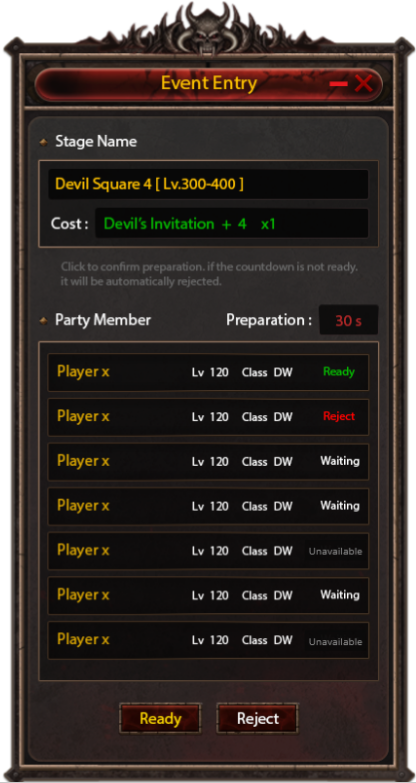
Event Entry Window
When the party leader initiates event entry,
the system displays the Event Entry window to all party members.
Member Status
Each member's status is shown in the Event Entry window as one of the following:
-
Waiting — Deciding
-
Ready — Confirmed and ready to join
-
Reject — Declined to join
-
Unavailable — Does not meet entry conditions (e.g. missing Ticket, insufficient Zen)
If a member's condition changes during this process, for example, obtaining the required Ticket or sufficient Currency, their status can update back to Waiting in real-time.
Ready / Reject Flow
Party members can select Ready to confirm participation, or Reject to decline.
If a member remains in the Waiting status for too long without responding, their status will automatically change to Reject. The party leader must then press Enter again to confirm entry for the final time.
Event Warp
When the party leader presses Enter, the system will verify every member's status one final time before the actual Warp takes place.
Only members whose status is Ready and who meet all entry conditions will be warped into the Event together.
Any cost or item required for the Event will only be deducted once the Warp into the Event is successfully completed.
Additional Rules
The party leader may choose to enter the Event Solo if no members select Ready, or if all members select Reject.